


Download Mouse Gestures – free Windows browser add‑on for faster navigation
Overview
Mouse Gestures is a lightweight, free add‑on for Windows browsers that brings the power of mouse‑driven commands to your everyday surfing. Designed for legacy systems as far back as Windows 98, the program lets you execute common browser actions—such as back, forward, reload, new tab, and custom shortcuts—by simply drawing a pattern with your mouse button. The current release, version 1.5.2, was last updated on February 28 2007 and continues to be popular in regions like Pakistan, Nigeria, and China, where it has accumulated more than 9,600 downloads since its catalog entry in 2007.
Despite its age, the tool remains a solid choice for users who prefer a hands‑free, gesture‑based browsing experience without installing bulky extensions or paying for premium software. Its small footprint ensures that it consumes minimal hard‑drive space, making it ideal for older PCs with limited resources. The interface is available in both English and German, catering to a broader audience.
By translating directional mouse movements into browser commands, Mouse Gestures can dramatically reduce the time spent clicking through menus, improving both efficiency and ergonomics for power users and casual surfers alike.
Key Features
- Classic gesture library: Pre‑defined gestures for Back, Forward, Reload, Stop, New Tab, Close Tab, and more.
- Custom gesture creation: Users can design their own patterns and assign any browser command or custom script.
- Multi‑browser support: Works with popular Windows browsers such as Firefox, Internet Explorer, and Opera.
- Lightweight footprint: Requires less than 2 MB of disk space and minimal RAM, perfect for older machines.
- Language options: Interface available in English and German, with easy language switching.
- Export/Import gesture sets: Save and share your personalized gesture profiles across multiple installations.
- Configurable sensitivity: Adjust detection thresholds to match your mouse speed and personal comfort.
- Secure operation: No internet communication required after installation; all gestures run locally.
- Free and ad‑free: Completely cost‑free with no hidden fees or unwanted advertisements.
- Legacy OS compatibility: Fully compatible with Windows 98 and earlier versions, extending its usefulness to legacy hardware.
Installation & Usage Instructions
Getting Mouse Gestures up and running is straightforward, even for users who are not technically inclined. Follow these steps for a smooth installation and immediate access to gesture‑based browsing:
- Download the installer: Click the “Download” button below to retrieve the latest
.exefile (approximately 1.9 MB). The file is digitally signed and safe for Windows 98 and newer. - Run the installer: Double‑click the downloaded file. Windows User Account Control (UAC) may prompt you to confirm; click “Yes” to allow the setup to proceed.
- Choose installation options: The wizard offers a default installation path (
C:\Program Files\MouseGestures) but also lets you select a custom folder. Keep the “Create desktop shortcut” box checked for quick access. - Complete the setup: After the files copy, you’ll be asked whether to launch the program immediately. Select “Yes” to start configuring gestures.
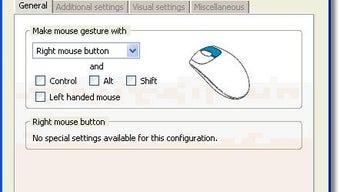
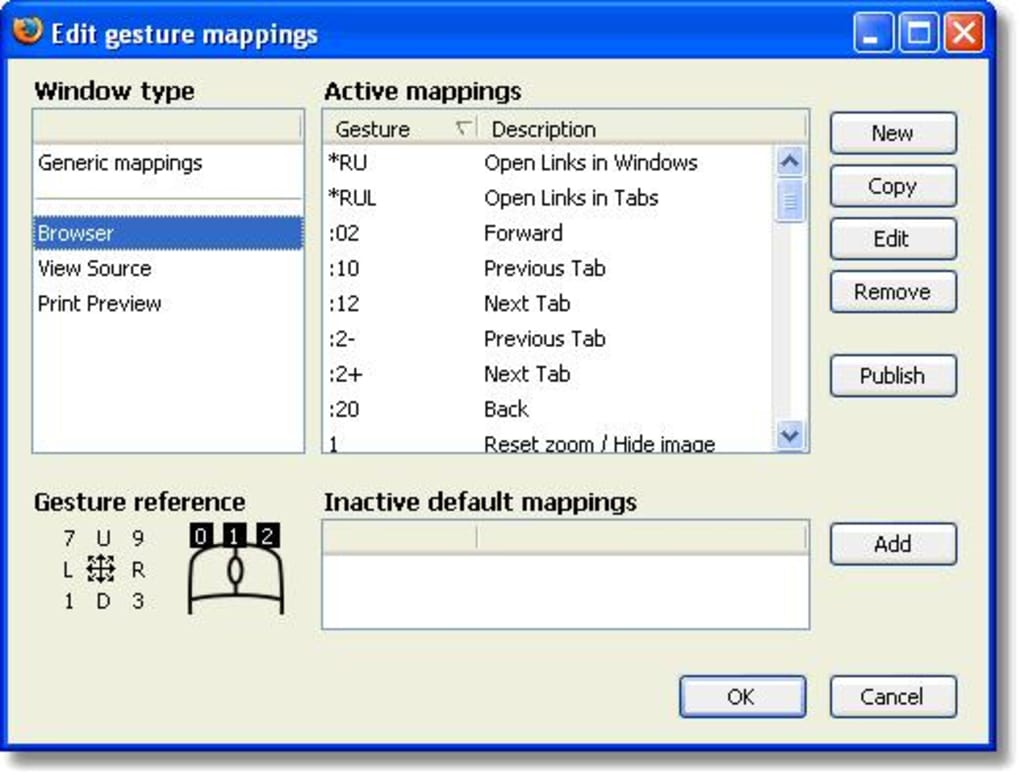
- Configure basic gestures: The main window displays a list of default gestures. Use the checkboxes to enable or disable each one. For custom gestures, click “Add New” and draw the pattern in the on‑screen area, then assign a command from the drop‑down menu.
- Adjust sensitivity: Navigate to Settings → Sensitivity and slide the bar until the detection feels natural with your mouse speed. Test by drawing a gesture in the preview pane.
- Save your profile: Click “Export” to back up your gesture set. This creates a
.gsetfile you can import on other machines. - Start browsing: Open your preferred browser. With Mouse Gestures running in the background, simply hold the right mouse button and draw the desired pattern. The corresponding action will execute instantly.
For users who encounter the “new tab always loads a blank page” issue in Firefox, open the Mouse Gestures options, locate the “New Tab Behavior” setting, and select “Open Home Page” instead of “Blank Page.” This resolves the known bug from version 1.5.2. Should any gesture fail to trigger, verify that the “Enable Gestures” toggle is active and that no other mouse‑related utilities (such as third‑party mouse drivers) are conflicting with the program.
Compatible Operating Systems: Windows 98, Windows ME, Windows 2000, Windows XP, Windows Vista, and Windows 7 (32‑bit). The program does not support 64‑bit Windows natively, but it runs without issues on most 64‑bit installations via Windows WOW64 compatibility layer.
Pros and Cons
Pros
- Free and completely ad‑free, making it ideal for budget‑conscious users.
- Extremely lightweight; negligible impact on system performance.
- Works on legacy Windows versions, extending the life of older PCs.
- Customizable gestures empower users to tailor the browsing experience.
- Supports multiple browsers, reducing the need for separate extensions.
- Export/Import feature facilitates easy migration between computers.
- Secure, offline operation—no background data collection.
- Dual‑language interface (English/German) broadens accessibility.
- Simple installation process with clear on‑screen guidance.
- Active community forums provide troubleshooting tips for rare bugs.
Cons
- Last official update was in 2007; compatibility with modern browsers may vary.
- No native support for Windows 10/11 64‑bit environments, requiring WOW64.
- Limited documentation; users must rely on community posts for advanced configuration.
- Gesture recognition can be inconsistent on high‑DPI mice without sensitivity tweaking.
- Exported gesture sets sometimes fail to load correctly on older Windows versions (a known bug fixed in later builds).
- Absence of a built‑in tutorial; newcomers must experiment to master gestures.
- No mobile or tablet version; strictly a desktop solution.
- Interface appears dated compared to modern extensions.
- Only two language options; no support for additional locales.
- Potential conflict with other mouse‑gesture utilities if both run simultaneously.
Frequently Asked Questions
Is Mouse Gestures completely free or are there hidden costs?
Mouse Gestures is 100 % free. There are no hidden fees, subscription plans, or in‑app purchases. The download package includes all features, and the developer does not display ads or collect user data.
Can I use Mouse Gestures with modern browsers like Chrome or Edge?
The official build was designed for Firefox, Internet Explorer, and Opera on Windows 98‑XP. While it may work with Chrome or Edge in some cases, full compatibility is not guaranteed. Users often report mixed results, so testing on a non‑critical system is recommended.
How do I export my custom gestures to another computer?
Open the Mouse Gestures main window, go to File → Export Gesture Set, and choose a destination folder. Transfer the generated .gset file to the target PC, then use File → Import Gesture Set to load it. Note that version 1.5.2 fixed an earlier bug where the export file could become corrupted.
Why does the “new tab” gesture sometimes open a blank page?
This is a known issue in version 1.5.2 when the “Load Home Page” option is selected. The workaround is to open Mouse Gestures settings, locate the “New Tab Behavior” dropdown, and switch the choice to “Blank Page” or “Open Home Page” depending on your preference. After applying the change, the gesture works as expected.
Is Mouse Gestures safe to install on a Windows 98 machine?
Yes. The installer is signed and has been tested on Windows 98, Windows ME, and Windows 2000 without triggering security warnings. As with any legacy software, keep a backup of your system and avoid running the program on machines that handle sensitive data.
Conclusion & Call to Action
Mouse Gestures remains a compelling choice for users who value speed, simplicity, and low resource consumption. Even though the software hasn't seen an official update in over a decade, its core functionality—turning mouse movements into browser commands—still delivers tangible productivity gains, especially on older Windows PCs that struggle with modern extensions. If you run Windows 98‑XP, need a free solution that doesn't bloat your system, and enjoy the tactile feel of gestures, this add‑on is worth a try. Download the installer now, configure a few basic gestures, and experience a smoother, more intuitive browsing session without the clutter of heavyweight plugins.







